GCC/G++ Basics
GCC/G++ Basics
Getting Started with g++
Installing GCC/G++ (Linux)
Install using your distribution's package manager.
sudo apt update
sudo apt install build-essential -y
// check versions
gcc --version
g++ --version
// CentOS / RHEL 7:
sudo yum groupinstall "Development Tools" -y
// CentOS Stream 8 / RHEL 8+ / Fedora:
sudo dnf groupinstall "Development Tools" -yInstalling GCC/G++ (Windows)
Download (URLs below) and add to your PATH environment variable so gcc/g++ commands work from any directory.
- MinGW
https://osdn.net/projects/mingw/downloads/68260/mingw-get-setup.exe/
https://www.mingw-w64.org/downloads/ (recommended)
A gotcha with MinGW and the <thread> standard library:
Using threads with plain MinGW 9.2.0 requires these extra steps:
- Download additional header files from this repository: https://github.com/meganz/mingw-std-threads
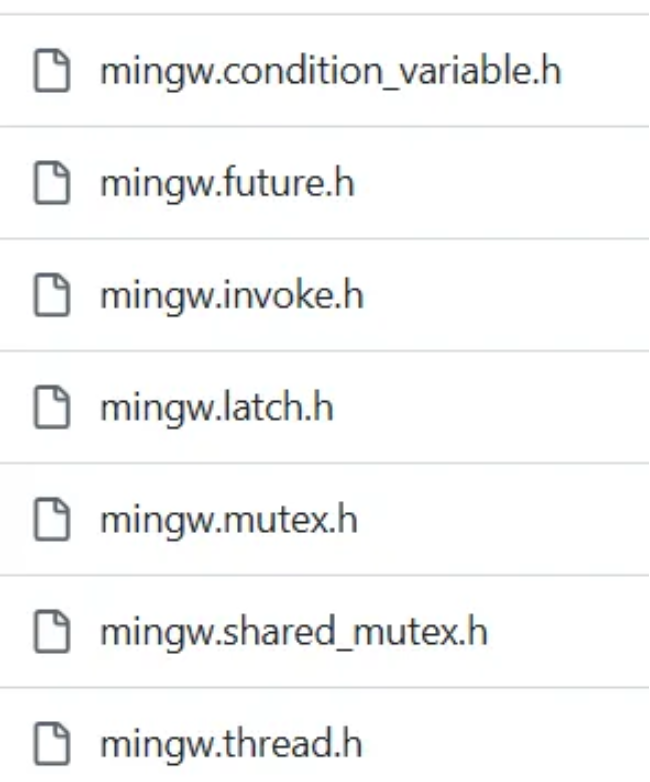
Place those header files into MinGW's include/ directory.
- In your code, change
#include <thread>to#include <mingw.thread.h>(as documented in the repository's README). - If compiling from the command line, add the flag
-D_WIN32_WINNT=0x0501to tell the compiler you are targeting Windows XP or later. (This may only be necessary for the win32 variant — the mingw-win64 version might not require it.)
The problematic version I used:

After switching to w64devkit:

Also note: plain MinGW requires you to separately install mingw32-make via the MinGW Installer (mingw-get.exe).
Basic g++ Usage Example
Create a text file (test.txt), rename its extension to .cpp (marking it as a C++ source file), open it with Notepad or VS Code, and write:
int main(){
    return 0;
}
Save and close the file.
Open a terminal (cmd) in the directory containing test.cpp and run:
g++ test.cppAn a.exe executable appears in the current directory. Since no output name was specified, the compiler uses the default name a.
To specify the output file name with -o:
g++ -o b test.cppThis produces b.exe in the current directory.
-o stands for output; the token immediately following it is the output filename. You can also reorder the arguments:
g++ test.cpp -o b(Note: the -o flag and its value must stay together — do not separate them.)
C/C++ compilation consists of four stages (the commands above show the all-in-one shortcut):
Preprocessing → Compilation → Assembly → Linking
| Stage | Input | Output & Extension | Flag (abbreviation meaning) |
|---|---|---|---|
| Preprocessing | .cpp/.h | Preprocessed file .i (Intermediate) | -E (Expansion) |
| Compilation | .i | Assembly code .s | -S (Source) |
| Assembly | .s | Object file .o | -c (Compile) |
| Linking | .o | Executable .exe or no extension | plain g++ |
Preprocessing stage: .cpp → .i
Handles #include (header inclusion), #define (macro expansion), #ifdef (conditional compilation), and similar directives.
g++ -E test.cpp  // print preprocessed output (expanded macros and included headers) to the terminal
g++ -E test.cpp -o preprocess.i  // write output to preprocess.i
Compilation stage: .i → .s
Translates preprocessed code into assembly.
g++ -S preprocess.i -o assemble.sAssembly stage: .s → .o
Converts assembly into machine code, producing an object file (not directly executable on its own).
g++ -c assemble.s -o machine.o
g++ -c test.cpp // you can also pass .cpp directly to generate the same-named .o
Linking stage: .o → .exe
Links one or more object files with libraries to produce an executable.
g++ machine.o -o testGenerating debug information:
g++ -g test.cpp -o test // includes debug symbols compared to plain g++ test.cpp -o test贡献者


最近更新
Involution Hell© 2026 byCommunityunderCC BY-NC-SA 4.0


